End Shift
Users can close their shift at any time. During closure, users will be prompted to reconcile their ending balances for each of the payment methods, transaction items, and currencies configured. The following additional information will be displayed to help users reconcile:
-
Starting balance
-
Debit balance
-
Credit balance
-
Ending balance
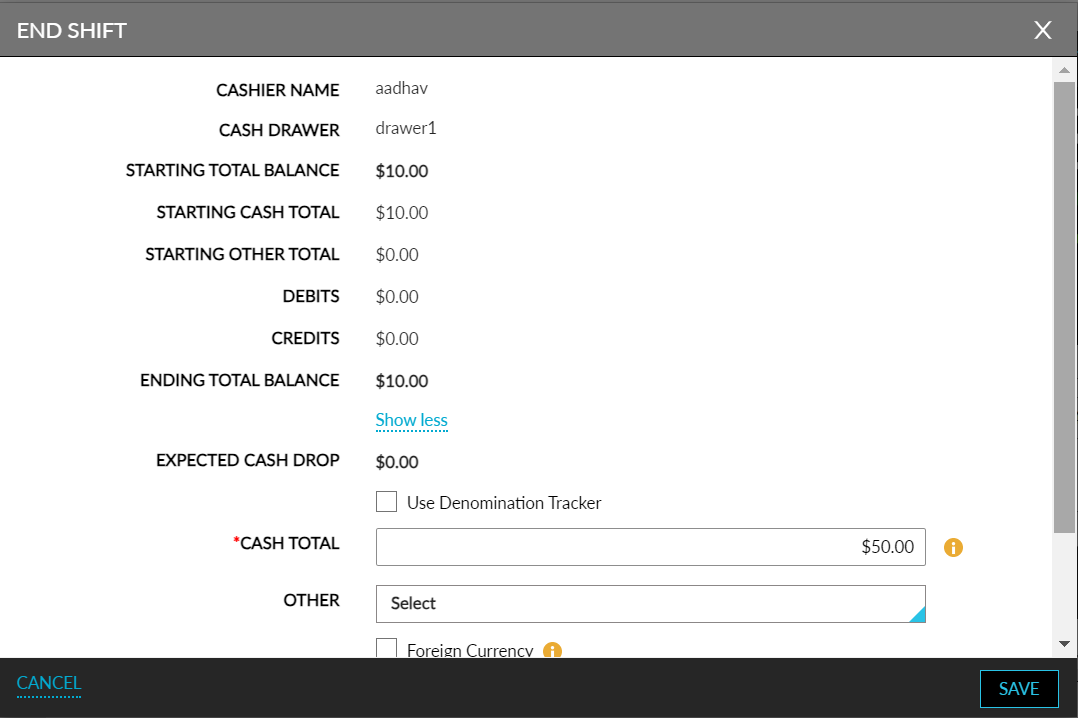
Refer to the following table to enter details in the End Shift screen when starting a shift:
|
Field |
Description |
|---|---|
|
Cashier Name |
Displays the username of the cashier logged in to Stay. |
|
Cash Drawer |
Displays the name of the cashier drawer selected by the cashier during the start of the shift. If the cashier has selected a shared drawer, closing balances are not required; users can proceed to save, and other input fields will be disabled. |
|
Starting Total Balance |
Displays the total balance as entered by the cashier when the shift was started. |
|
Show More |
Click the hyperlink to expand and view the other system-generated balances |
|
Starting Cash Total |
Displays the Cash Total amount as per the start of shift. |
|
Starting Other Total |
Displays the Other Total amount as per the start of shift. |
|
Starting Foreign Currency Total |
Displays the Foreign Currency Total amount as per the start of shift. |
|
Debits |
Displays the sum of refunds performed by the cashier. This amount will include only the cash payment method. |
|
Credits |
Displays the sum of payments made by the cashier. This amount will include only the cash payment method. |
|
Ending Total Balance |
Displays the ending balance in total for the cashier. The amount is calculated by adding the difference between the credits and the debits and the Total Starting Balance. That is (Credits – Debits) + Total Starting Balance. |
|
Show Less |
Click the hyperlink to close the expanded view of other system-generated balances. |
|
Expected Cash Drop |
The sum of the Expected Cash Drop of cashiers who have previously ended their shift using the same drawer + the total of all debit/credit transactions in cash for the cashier who has currently logged in to end the shift. |
|
Use Denomination Tracker |
The property can configure whether the denomination tracker must be made mandatory or not. If the property decides to use the denomination tracker mandatorily the Use Denomination Tracker checkbox will not be displayed in the End Shift screen and users will be forced to use the denomination tracker always. |
|
Cash Total |
|
|
Other |
This is a multi-select drop-down list of all other payment methods that are of the Cash payment class other than the Cash payment method itself. Users can select the preferred payment methods and enter the starting balance for each method. |
|
Other Total |
Displays the sum which is auto calculated for all other payment methods of the Cash payment class entered by the user. This field cannot be edited. |
|
Foreign Currency |
To add more foreign currencies to the End Shift screen, users must click the add button. To delete the foreign currencies from the End Shift screen, users must click the delete button. |
|
Foreign Currency Total |
Displays the sum of all amounts in the local currency entered for every foreign currency selected. This is a non-editable field. |
|
Total Entered Balance |
Displays the sum of cash total, other cash totals, and the foreign currency totals. |
|
Cash Drop |
User can enter the amount of cash dropped in the safe. |
-
When the property has turned off blind drop cashiering and when the user clicks Save, a new page displaying the Cashier End Activity Report is opened. When ending the shift, the date and timestamp are captured upon saving.
-
When the property has turned on both the options of shift tracking and blind drop cashiering and when users click Save, only users with the Stay_Run_Cashier_Report permission assigned will have the Cashier End Activity Report displayed in a new page. Users without this permission will not be able to access the Cashier End Activity reports.
-
When the property has turned on the blind drop cashiering option, users will be displayed the ending balance-related fields on the screen, and fields such as Starting Balances, Debits, Credits, and so on will not be displayed to the cashiers.
Alert for Cash Balance Variance
When the value displayed in the Ending Total Balance and the value entered in the Total Entered Balance do not match, the following alert is displayed to the user: Please note that there is a cash balance variance noted upon end shift. You will require approval from a supervisor to end your shift.
When the property has enabled the option to allow users to override cash overage or shortage, users must authenticate themselves before ending the shift with a variance in cash balance. The option to override will not be permitted when the property has the blind drop cashiering option enabled.